
Notifications
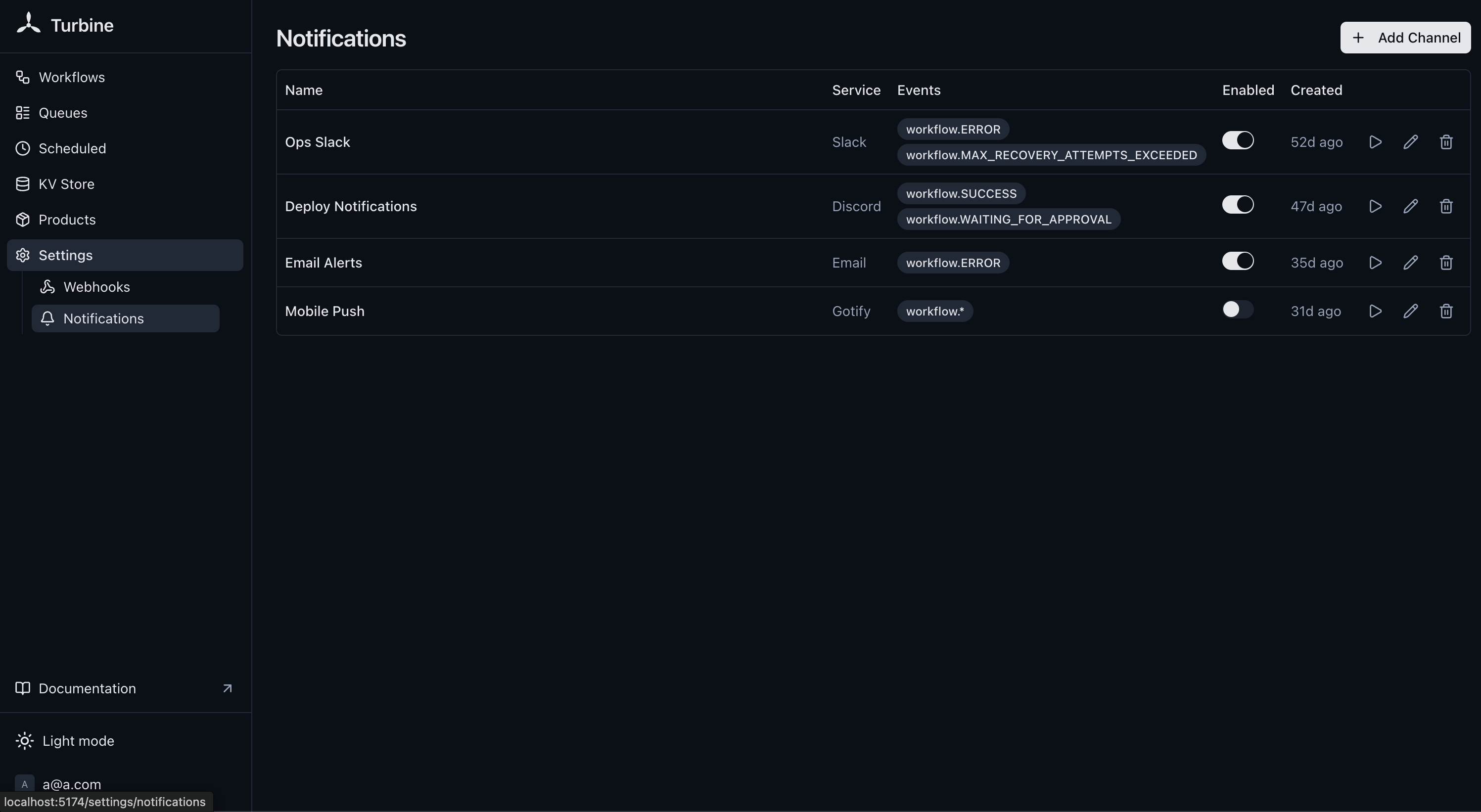
Turbine can send human-readable notifications to services like Slack, Discord, Telegram, and email when workflows complete. Powered by Shoutrrr, configured via the pt_alert_channels collection, manageable from the dashboard under Settings > Notifications.
For programmatic integrations with structured JSON payloads, see Webhooks.
Schema
Channels live in the pt_alert_channels collection:
| Field | Type | Description |
|---|---|---|
name | string | Friendly label, e.g. "Slack #alerts" (required) |
url | string | Shoutrrr URL (required) |
events | json | Array of event names to subscribe to (required) |
enabled | bool | Whether the channel is active |
Supported Services
| Service | URL Format |
|---|---|
| Slack | slack://xoxb:token@channel |
| Discord | discord://token@webhookid |
| Telegram | telegram://token@telegram?chats=@channel |
| Email (SMTP) | smtp://user:pass@host:port/?to=recipient |
| Teams | teams://token |
| Gotify | gotify://host/token |
| Ntfy | ntfy://topic |
| Pushover | pushover://token:apitoken@user |
| Matrix | matrix://user:pass@host |
| Generic webhook | generic+https://example.com/endpoint |
See the Shoutrrr docs for the full list of supported services and their URL formats.
Events
Same events as Webhooks:
| Event | Fires when |
|---|---|
workflow.SUCCESS | Workflow completed successfully |
workflow.ERROR | Workflow failed with an error |
workflow.CANCELLED | Workflow was cancelled |
workflow.WAITING_FOR_APPROVAL | Workflow is paused at an approval gate |
workflow.MAX_RECOVERY_ATTEMPTS_EXCEEDED | Workflow exceeded max recovery attempts (dead letter) |
workflow.* | Any of the above events |
Message Format
Notifications are plain-text messages:
[Turbine] Workflow "orderProcessing" (abc123) completed successfully
[Turbine] Workflow "orderProcessing" (abc123) failed: connection refused
[Turbine] Workflow "orderProcessing" (abc123) cancelled
[Turbine] Workflow "orderProcessing" (abc123) is waiting for approval
[Turbine] Workflow "orderProcessing" (abc123) exceeded max recovery attempts
Sending Custom Messages
You can send an ad-hoc message to a configured channel from Go code, in addition to the automatic event-driven dispatch.
From a step (or any code that has the step's context.Context):
turbine.Register(rt, "nightlyImport", func(ctx turbine.Context) (any, error) {
    rows, err := turbine.Do(ctx, func(ctx context.Context) (int, error) {
        rows := importRows(ctx)
        if rows < 100 {
            if err := turbine.SendNotification(ctx, "ops-alerts",
                fmt.Sprintf("Unusual row count in nightly import: %d", rows)); err != nil {
                turbine.LoggerFrom(ctx).Warn("notification failed", "error", err)
            }
        }
        return rows, nil
    })
    return rows, err
})
Or directly on the runtime, from host code (HTTP handlers, cron jobs, etc.):
if err := rt.SendNotification("ops-alerts", "Backfill finished"); err != nil {
    log.Printf("notification failed: %v", err)
}
Channels are looked up by their name field. Disabled channels are a silent no-op, calling SendNotification against a disabled channel returns nil without sending, matching the event-driven dispatch behavior. Toggling a channel off mutes both manual and automatic sends. If multiple channels share the same name, the first match is used, keep names unique. Unlike event-driven dispatch, this call is synchronous and returns the underlying delivery error, so the caller can decide whether to log, retry, or surface it.
Testing
Each channel has a Test button in the dashboard that sends a test notification to verify the URL is configured correctly.
Delivery
WARNING
Notifications are fire-and-forget. Failed deliveries are logged but not retried. For critical alerting, consider using a service with built-in retry like a webhook endpoint.
Notifications are dispatched asynchronously and don't block workflow completion.
Dashboard
Security
Notification URLs contain embedded credentials (tokens, passwords). URLs are masked when read through the API, only the service scheme is visible (e.g. slack://***). The full URL is stored in the database and used only for dispatch.